
What it does
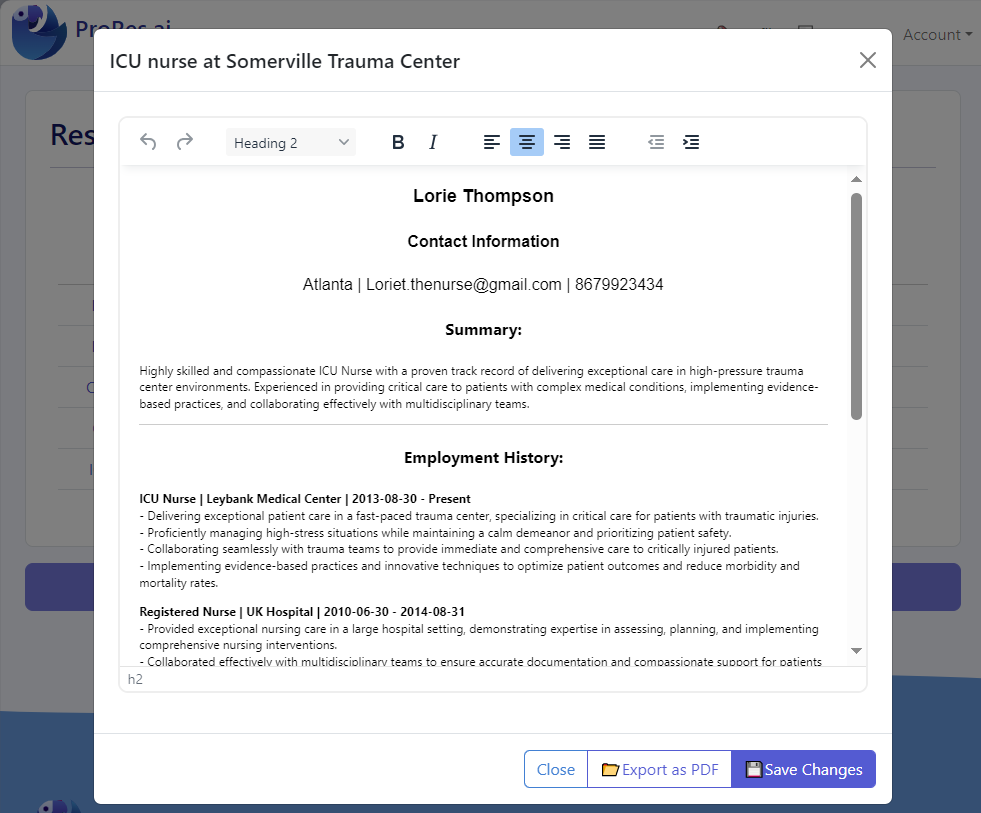
A resume editor is where good resumes become great ones. After you import content or generate a draft, you still need to refine wording, improve clarity, and ensure the final document looks professional when exported.
What a resume editor helps you control
- Clarity: tighter bullets, less filler, stronger outcomes.
- Structure: section order and emphasis aligned to the role you want.
- Consistency: dates, titles, tense, and formatting remain stable.
- Output: export a clean PDF that looks consistent across devices and portals.
- Versioning: tailor multiple resume variants without losing your baseline.
Common editing problems ProRes avoids
- Formatting drift when you add/remove bullets and sections.
- Spacing issues that push key content onto a second page unintentionally.
- Inconsistent styles caused by pasting from multiple sources.
ProRes is designed for iteration. Your resume shouldn’t break every time you adjust a bullet point.
How it works
- Start from a solid base (import an existing resume or generate a new draft).
- Edit the content: tighten bullets, add specifics, and remove fluff.
- Check structure: section order, readability, and scannability.
- Export to PDF for consistent formatting when you upload to job portals.
- Validate with a resume review to catch ATS parsing issues and keyword gaps.
Editing checklist (high-signal)
- Top third: is it obvious what role you want and what you’re strong at?
- Bullets: do the first 1–2 bullets per role show your best impact?
- Skills: do you list the tools recruiters actually search for in your target role?
- Proof: do your bullets back up your skills with concrete examples?
- Length: did you remove older/less relevant details to keep signal high?
A good editing workflow is: write → simplify → quantify → validate. You’ll often get a better resume by removing noise than by adding more text.
Who it’s for
- People revising resumes frequently (active applicants, consultants, contractors).
- Applicants tailoring for different job targets who need clean, consistent versions.
- Anyone receiving feedback from recruiters or mentors and needing quick changes.
- Applicants exporting for portals who need a PDF that stays stable when uploaded.
If you’re making the same edits repeatedly across multiple resumes, you need an editing workflow that’s built for versioning and reuse.
Examples & screenshots
Tips & best practices
- Lead with outcomes: start bullets with what you achieved, not what you were “responsible for.”
- Trim filler words (helped, assisted, worked on) and replace with precise actions.
- Quantify impact where possible (%, $, time saved, volume, scale).
- Keep section order intentional: put the most relevant content closer to the top.
- Use consistent tense: present tense for current role, past tense for previous roles.
- Optimize for scanning: 2–3 lines per bullet max is a good baseline.
- Re-check ATS risk after edits, especially if you changed formatting or added graphics.
- Promote the right keywords: if a skill is required for the role, ensure it appears in Skills and is supported in bullets.
- Use a “relevance filter”: keep bullets that prove the target role; cut bullets that don’t.
ProRes differentiator
ProRes is designed around iterative resume creation: import or build a profile, generate a targeted draft, edit it cleanly, export, and then validate with a resume review. That end-to-end flow reduces rework and prevents formatting regressions.
FAQ
Traditional editors can work, but they often become slow to iterate when you’re tailoring multiple versions (spacing shifts, style inconsistencies, copy/paste issues). ProRes is designed around resume iteration and reuse, so you can make changes faster and keep output consistent.
Yes. Import is meant to capture your existing content quickly. After import, you’ll typically tighten bullets, add missing details, and adjust structure so the final version reads cleanly and matches your target role.
Keep it simple: standard headings, clear section order, minimal columns/tables, and consistent dates. After you export your final version, run the ProRes resume review tool to catch ATS issues before applying.
Maintain a strong “base” resume and create targeted versions that emphasize different skills and accomplishments. The editor workflow should preserve consistency (titles, dates) while allowing content emphasis to change per role.
You don’t need to rewrite from scratch, but light tailoring often helps: align skills, reorder bullets, and adjust your summary to match the role. Small changes can improve recruiter search match and clarity.
Prioritize relevance. Keep your most relevant accomplishments, remove older/less related details, and use concise bullets. A tight one-page resume can outperform a longer one if it’s targeted and specific.
Open the PDF and check for broken line wraps, missing bullets, and consistent spacing. Then run a resume review to confirm the final file stays ATS-readable and keyword-aligned for your target role.
Polish your resume, then run a final review
After you edit and export your resume, validate it with a free resume review to catch ATS risks and keyword gaps before you submit applications.